Smart Hub Help
How do I upgrade RealityAdapter to the latest version?
RealityAdapter can be upgraded through the RealityApp. Long press the RealityAdapter icon to get into the device detail page then click “Check for updates”. Do not disconnect power or network while device is updating.
*During updating, all devices connected to the adapter will not function until the upgrade is completed.
What happens if the RealityAdapter loses connection with power or internet?
All devices should reconnect automatically. However if a device can't recover, try moving it closer to the RealityAdapter or re-pair the device.
Why are my SmartThings hub and APP having difficulty finding my Third RealitySwitch?
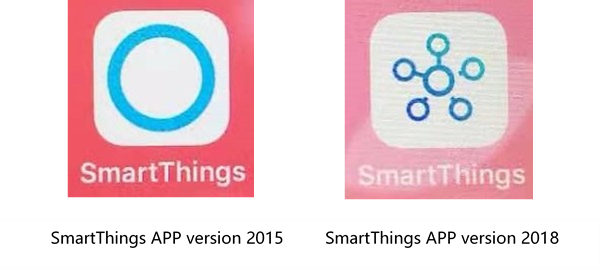
Please check your SmartThings APP version,
if you are using the 2018 version (the icon is 6 small circles), please go to try version 2015 (the icon is a big circle). Because the 2108 version does not refresh correctly, it will
sometimes, incorrectly displays a message indicating that no device has been found. Typically when this happens, the switch has actually has been already added to the devices list, the 2015 version does not have this issue.
When I pair my switch with smartthings hub, why does the LED on the switch go from fast blinking to off, then shortly thereafter, the LED on the switch begins fast blinking again before failing to join the network?
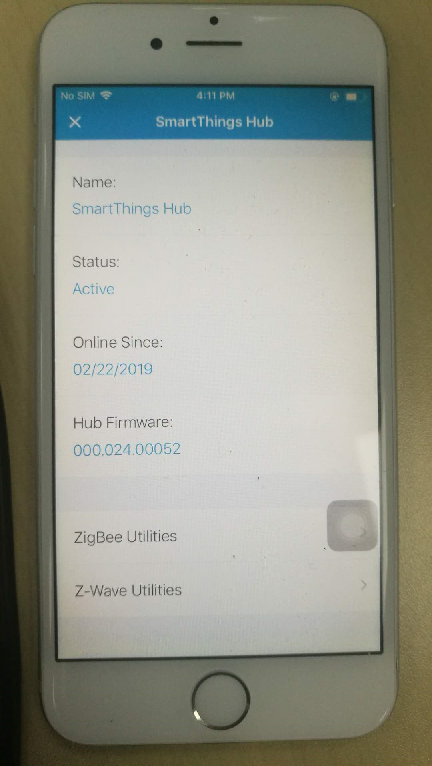
If this happen, please check your SmartThings hub model, if your model number is ET-WV52X (ET-WV520, ET-WV525, etc.), please make sure your firmware number is 000.024.052 or above (this can be found on your SmartThings APP). If the firmware version is lower than that version, the SmartThing hub is not a full Zigbee 3.0 compatible product, it may have compatiblity issue with a standard Zigbee 3.0 device like the Third Reality switch.